# CallRecordz

MS Teams ContactCentre solution for iMIS

# AI ContactCentre – Teams for iMIS

## **Executive Overview**

<table border="1" id="bkmrk-publisher-zentso-s-g" style="border-collapse: collapse; width: 55%;"><colgroup><col style="width: 27.5793%;"></col><col style="width: 72.4207%;"></col></colgroup><tbody><tr><td><span class="s2">**Publisher**</span></td><td>ZENTSO S GmbH</td></tr><tr><td><span class="s2">**Product**</span></td><td>AI ContactCentre – Teams for iMIS</td></tr><tr><td><span class="s2">**Version**</span></td><td>2025–2026 Roadmap</td></tr><tr><td><span class="s2">**Audience**</span></td><td>iMIS and CloudToolz Clients</td></tr></tbody></table>

## **1. Vision: AI-Enhanced Calling for iMIS**

AI ContactCentre brings Microsoft Teams calling directly into iMIS by combining your existing Teams Phone auto attendants, call queues, and softphone with CRM context and AI documentation.

Staff receive calls through the <span class="s2">**Teams app**</span>, see who is calling in <span class="s2">**iMIS**</span>, click to call from inside iMIS, and get automatic summaries, transcripts, and follow-up actions — all without changing your telephony infrastructure.

This is a <span class="s2">**CRM Companion Strategy**</span>: enhance your existing Teams Phone environment with intelligent, integrated CRM capabilities that improve service quality and reduce manual work.

## **2. The Low-Hanging Fruits**

**Immediate value without workflow redesign or telephony changes.**

### **1) Caller Identification in Real Time**

As calls arrive through your existing auto attendants and call queues, iMIS instantly shows:

- Member name and status
- Recent activity
- Engagement history
- Outstanding tasks, cases, or renewals

No searching. No context switching.

### **2) One-Click Call Capture**

After the call:

- Click “Save Call”
- iMIS records call metadata, duration, and notes automatically
- No duplication or manual re-entry

### **3) AI Summaries and Transcripts**

AI ContactCentre provides:

- Complete transcription
- Condensed summary
- Key decisions
- Follow-up actions

Staff only need to review → approve → save.

### **4) Teams Recording Linked Automatically**

iMIS stores:

- Call summary
- Transcript
- Metadata
- Secure Teams recording link

Everything is captured in one CRM record.

### **5) Automated Follow-Up Actions**

Flowz automation can:

- Create tasks
- Assign staff
- Trigger renewals
- Flag risk indicators

AI listens → Flowz automates → iMIS updates.

**3. Key Benefits**

<table id="bkmrk-category-benefit-eff"><thead><tr><th>**Category**

</th><th>**Benefit**

</th></tr></thead><tbody><tr><td>**Efficiency**

</td><td>Calls handled in Teams; intelligence surfaced directly in iMIS.

</td></tr><tr><td>**AI Assistance**

</td><td>Reduce manual note-taking with accurate AI summaries.

</td></tr><tr><td>**Quality Control**

</td><td>Supervisors gain visibility into call outcomes and recordings.

</td></tr><tr><td>**Insight**

</td><td>Analyse call volumes, sentiment, and common topics.

</td></tr><tr><td>**Consistency**

</td><td>Standardised call records across all staff.

</td></tr><tr><td>**Scalability**

</td><td>Roll out team by team across the organisation.

</td></tr></tbody></table>

## **4. Solution Overview**

AI ContactCentre is a <span class="s1">**CRM Companion Layer for Microsoft Teams Phone**</span>, designed specifically for iMIS environments.

It integrates:

- <span class="s1">**Teams Phone calling**</span> (receive calls in the Teams app)
- **Existing auto attendants and call queues**
- <span class="s1">**iMIS CRM**</span> (real-time caller recognition and history)
- <span class="s1">**CloudToolz Flowz**</span> (automated post-call workflows)
- <span class="s1">**AI intelligence**</span> (summaries, transcripts, insights)

There is <span class="s1">**no change**</span> to PSTN routing, calling plans, carriers, or SBCs.

You enhance what you already have.

### **What Staff Can Do**

- **Receive inbound calls in the Teams app**
    
    Calls flow through your existing routing configuration.
- **See who is calling in iMIS immediately**
    
    Automatic caller recognition and CRM context.
- **Make outbound calls directly from iMIS**
    
    Click-to-call launches the Teams softphone with context.
- **Capture structured call records automatically**
    
    Including metadata, summary, transcript, and recording link.
- **Trigger Flowz workflows after calls**
    
    Tasks, escalations, renewals, or follow-up processes.

This is a low-friction, high-impact enhancement layered on top of Microsoft Teams Phone.

## **5. Recommended Client Next Steps**

To successfully adopt AI ContactCentre and realise immediate value, we recommend the following phased approach:

1. **Review your current call flows**
    
    Auto attendants, queues, business hours rules.
2. **Select a pilot team**
    
    Membership, customer service, renewals, or support.
3. **Enable AI summaries for that team**
    
    Deliver immediate reduction in manual documentation.
4. **Roll out in a controlled phase**
    
    Train staff on one-click logging and AI-assisted workflows.
5. **Scale to additional departments**
    
    Expand to finance, events, certifications, or broader service teams.

This structured approach ensures quick wins, clear visibility, and smooth organisational adoption.

# AI ContactCenterGuru – Teams for iMIS

## **Chapter 1 — Executive Overview**

### **Executive Summary**

<table border="1" id="bkmrk-publisher-zentso-s-g" style="border-collapse: collapse; width: 59.7619%;"><colgroup><col style="width: 28.5127%;"></col><col style="width: 71.4873%;"></col></colgroup><tbody><tr><td><span class="s2">**Publisher**</span></td><td>ZENTSO S GmbH</td></tr><tr><td><span class="s2">**Product**</span></td><td>AI ContactCenterGuru – Teams for iMIS</td></tr><tr><td><span class="s2">**Audience**</span></td><td>iMIS &amp; CloudToolz Clients</td></tr><tr><td><span class="s2">**Version**</span></td><td>2025–2027 Roadmap</td></tr></tbody></table>

**AI ContactCenterGuru** integrates Microsoft Teams Phone with the iMIS Staff Site, providing agents with caller identification, AI call summaries, call transcripts, and automated follow-up workflows — all inside iMIS.

**Core Promise:**

> **Every call becomes an intelligent CRM event — enriched, analysed, and automated.**

### **Key Benefits**

<table id="bkmrk-category-benefit-eff" style="width: 73.8095%;"><thead><tr><th style="width: 21.4808%;">**Category**

</th><th style="width: 78.5192%;">**Benefit**

</th></tr></thead><tbody><tr><td style="width: 21.4808%;">Efficiency

</td><td style="width: 78.5192%;">Handle calls directly within iMIS and see caller info instantly.

</td></tr><tr><td style="width: 21.4808%;">Automation

</td><td style="width: 78.5192%;">Flowz automates post-call tasks and CRM updates.

</td></tr><tr><td style="width: 21.4808%;">AI Insights

</td><td style="width: 78.5192%;">Summaries, transcripts, sentiment, next actions.

</td></tr><tr><td style="width: 21.4808%;">Accuracy

</td><td style="width: 78.5192%;">Consistent call logging into iMIS.

</td></tr><tr><td style="width: 21.4808%;">Scalability

</td><td style="width: 78.5192%;">Start with CRM Companion; expand to full contact center later.

</td></tr><tr><td style="width: 21.4808%;">Compliance

</td><td style="width: 78.5192%;">Azure AD identity, org\_id isolation, GDPR-aligned.

</td></tr></tbody></table>

### **Business Value by Role**

<table id="bkmrk-role-value-propositi" style="height: 135px; width: 73.8095%;"><thead><tr><th style="width: 22.0166%;">**Role**

</th><th style="width: 77.9846%;">**Value Proposition**

</th></tr></thead><tbody><tr><td style="width: 22.0166%;">Agents

</td><td style="width: 77.9846%;">Reduce admin; AI handles summaries &amp; logs.

</td></tr><tr><td style="width: 22.0166%;">Supervisors

</td><td style="width: 77.9846%;">Queue visibility, call outcomes, agent metrics.

</td></tr><tr><td style="width: 22.0166%;">Executives

</td><td style="width: 77.9846%;">KPI dashboards &amp; engagement intelligence.

</td></tr><tr><td style="width: 22.0166%;">IT/Admins

</td><td style="width: 77.9846%;">Secure, Teams-native, easy to manage.

</td></tr></tbody></table>

## **Chapter 2 — Product Strategy**

### **CRM Companion Strategy**

**AI ContactCenterGuru** begins as a <span class="s2">**CRM Companion**</span>, using:

- Teams Phone Auto Attendants
- Call Queues
- Teams Client (for audio)
- Graph APIs (call records &amp; metadata)
- CloudToolz + Flowz (workflow automation)
- AI (summary, transcript, next steps)

This approach provides:

- Fast implementation
- Zero disruption to Teams calling
- Minimal change management
- High immediate value
- No need for Unify/TPE yet

### **Future Unify/TPE Strategy**

Once clients need a full CCaaS capability:

- Add native softphone inside iMIS (ACS Calling SDK)
- Use Teams Phone Extensibility + Event Grid for PSTN routing
    
    
    - Whisper/coach
    - Live supervisor monitoring
    - Custom call flows
    - Contact Center Certification pathway
    - Build advanced supervisor &amp; routing features:

<span class="s2">This becomes **AI** </span>**ContactCenterGuru CCaaS for iMIS**<span class="s2">.</span>

## **Chapter 3 — Solution Architecture**

### **Architecture Overview**

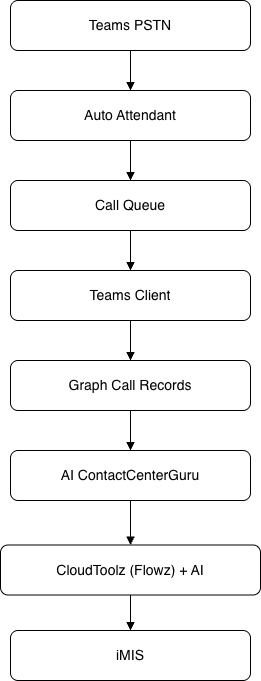
<div drawio-diagram="1403"><img src="https://docs.zentso.com/uploads/images/drawio/2025-11/Ug4nJASP9oEhTp5t-drawing-11-1763442204.png" alt=""/></div>

Agents keep using the Teams client for audio, but all integration, automation, and AI run through CloudToolz.

### **Inbound &amp; Outbound Call Flows**

#### **Inbound Call Handling**

1. Caller reaches Auto Attendant → Call Queues
2. Agent answers in Teams
3. AI ContactCenterGuru detects call via Graph
4. Contact match → iMIS screen pop / Contact not match -&gt; iMIS screen pop for new contact
5. Flowz logs the call
6. Recording → AI → Summary + Transcript
7. Results written back into iMIS

#### **Outbound Call Handling**

- iMIS contact → Call via Teams button
- Teams client initiates the call
- Call results logged by AI ContactCenterGuru

### **AI &amp; Flowz Automation**

- AI transcription
- AI call summary
- Key actions extracted
- Sentiment scoring
- Suggested follow-up tasks
- Flowz creates: 
    - Activities
    - Cases
    - Renewal tasks
    - Service workflows

### **Security &amp; Compliance**

- Azure AD OAuth2
- CloudToolz instance data isolation
- GDPR- and Privacy Act 1988-aligned call record handling
- Optional recording retention policy
- Logging for audits

## **Chapter 4 — Roadmap**

### **Roadmap Overview (2025–2027)**

- Phase 1 – MVP (Q1 2026)
- Phase 2 – AI &amp; Automation (Q2–Q3 2026)
- Phase 3 – Supervisor Tools (Q4 2026)
- Phase 4 – Optional Unify/TPE (2027+)

### **Phase Details**

#### **Phase 1 – MVP (CRM Companion Core)**

- Screen pop
- Caller matching
- Call logging
- Basic analytics

#### **Phase 2 – AI &amp; Automation**

- AI summary
- Transcript
- Recording link
- Flowz task automation
- Enhanced dashboards

#### **Phase 3 – Supervisor Tools**

- Queue visibility
- Agent presence
- Real-time dashboards

#### **Phase 4 – Optional Unify/TPE**

- Native softphone inside iMIS
- Advanced call control

## **Chapter 5 — PERT &amp; Implementation**

### **PERT Overview**

**AI ContactCenterGuru CRM Companion** implementation is based on <span class="s2">**13 core work packages**</span>, totalling:

**≈ 540–720 hours**

(depending on AI features and recording availability)

### **Work Breakdown Structure (13 Tasks)**

<table id="bkmrk-%23-task-phase-o-m-p-1" style="height: 340px; width: 85.9524%;"><thead><tr><th style="width: 4.71567%;">**\#**

</th><th style="width: 35.6449%;">**Task**

</th><th class="align-center" style="width: 9.84743%;">**Phase**

</th><th class="align-center" style="width: 17.4707%;">**O**

</th><th class="align-center" style="width: 15.539%;">**M**

</th><th class="align-center" style="width: 16.7822%;">**P**

</th></tr></thead><tbody><tr><td style="width: 4.71567%;">1

</td><td style="width: 35.6449%;">Tech Spec &amp; Architecture

</td><td class="align-center" style="width: 9.84743%;">1

</td><td class="align-center" style="width: 17.4707%;">16

</td><td class="align-center" style="width: 15.539%;">20

</td><td class="align-center" style="width: 16.7822%;">28

</td></tr><tr><td style="width: 4.71567%;">2

</td><td style="width: 35.6449%;">UI Shell Integration

</td><td class="align-center" style="width: 9.84743%;">1

</td><td class="align-center" style="width: 17.4707%;">32

</td><td class="align-center" style="width: 15.539%;">44

</td><td class="align-center" style="width: 16.7822%;">64

</td></tr><tr><td style="width: 4.71567%;">3

</td><td style="width: 35.6449%;">Contact Match &amp; Screen Pop

</td><td class="align-center" style="width: 9.84743%;">1

</td><td class="align-center" style="width: 17.4707%;">24

</td><td class="align-center" style="width: 15.539%;">36

</td><td class="align-center" style="width: 16.7822%;">50

</td></tr><tr><td style="width: 4.71567%;">4

</td><td style="width: 35.6449%;">Call Logging

</td><td class="align-center" style="width: 9.84743%;">1

</td><td class="align-center" style="width: 17.4707%;">24

</td><td class="align-center" style="width: 15.539%;">32

</td><td class="align-center" style="width: 16.7822%;">48

</td></tr><tr><td style="width: 4.71567%;">5

</td><td style="width: 35.6449%;">Basic Dashboard

</td><td class="align-center" style="width: 9.84743%;">1

</td><td class="align-center" style="width: 17.4707%;">16

</td><td class="align-center" style="width: 15.539%;">24

</td><td class="align-center" style="width: 16.7822%;">40

</td></tr><tr><td style="width: 4.71567%;">6

</td><td style="width: 35.6449%;">AI Transcription

</td><td class="align-center" style="width: 9.84743%;">2

</td><td class="align-center" style="width: 17.4707%;">28

</td><td class="align-center" style="width: 15.539%;">40

</td><td class="align-center" style="width: 16.7822%;">56

</td></tr><tr><td style="width: 4.71567%;">7

</td><td style="width: 35.6449%;">Flowz Automation

</td><td class="align-center" style="width: 9.84743%;">2

</td><td class="align-center" style="width: 17.4707%;">32

</td><td class="align-center" style="width: 15.539%;">48

</td><td class="align-center" style="width: 16.7822%;">64

</td></tr><tr><td style="width: 4.71567%;">8

</td><td style="width: 35.6449%;">iMIS Summary Storage

</td><td class="align-center" style="width: 9.84743%;">2

</td><td class="align-center" style="width: 17.4707%;">24

</td><td class="align-center" style="width: 15.539%;">40

</td><td class="align-center" style="width: 16.7822%;">56

</td></tr><tr><td style="width: 4.71567%;">9

</td><td style="width: 35.6449%;">Enhanced Dashboards

</td><td class="align-center" style="width: 9.84743%;">2

</td><td class="align-center" style="width: 17.4707%;">16

</td><td class="align-center" style="width: 15.539%;">28

</td><td class="align-center" style="width: 16.7822%;">40

</td></tr><tr><td style="width: 4.71567%;">10

</td><td style="width: 35.6449%;">Queue Monitoring

</td><td class="align-center" style="width: 9.84743%;">3

</td><td class="align-center" style="width: 17.4707%;">20

</td><td class="align-center" style="width: 15.539%;">32

</td><td class="align-center" style="width: 16.7822%;">48

</td></tr><tr><td style="width: 4.71567%;">11

</td><td style="width: 35.6449%;">Supervisor Panel

</td><td class="align-center" style="width: 9.84743%;">3

</td><td class="align-center" style="width: 17.4707%;">24

</td><td class="align-center" style="width: 15.539%;">36

</td><td class="align-center" style="width: 16.7822%;">56

</td></tr><tr><td style="width: 4.71567%;">12

</td><td style="width: 35.6449%;">UAT &amp; Hardening

</td><td class="align-center" style="width: 9.84743%;">All

</td><td class="align-center" style="width: 17.4707%;">16

</td><td class="align-center" style="width: 15.539%;">28

</td><td class="align-center" style="width: 16.7822%;">40

</td></tr><tr><td style="width: 4.71567%;">13

</td><td style="width: 35.6449%;">Docs &amp; GTM

</td><td class="align-center" style="width: 9.84743%;">All

</td><td class="align-center" style="width: 17.4707%;">20

</td><td class="align-center" style="width: 15.539%;">40

</td><td class="align-center" style="width: 16.7822%;">60

</td></tr></tbody></table>

### **Implementation Timeline &amp; Milestones**

<table id="bkmrk-milestone-target-pro" style="height: 212px; width: 40.119%;"><thead><tr><th style="width: 49.8516%;">**Milestone**

</th><th style="width: 49.8516%;">**Target**

</th></tr></thead><tbody><tr><td style="width: 49.8516%;">Prototype

</td><td style="width: 49.8516%;">Jan 2026

</td></tr><tr><td style="width: 49.8516%;">Internal Pilot

</td><td style="width: 49.8516%;">Feb 2026

</td></tr><tr><td style="width: 49.8516%;">Client UAT

</td><td style="width: 49.8516%;">Mar 2026

</td></tr><tr><td style="width: 49.8516%;">GA Release

</td><td style="width: 49.8516%;">Apr 2026

</td></tr><tr><td style="width: 49.8516%;">Full AI + Supervisor

</td><td style="width: 49.8516%;">Q3–Q4 2026

</td></tr><tr><td style="width: 49.8516%;">Optional TPE

</td><td style="width: 49.8516%;">2027

</td></tr></tbody></table>

## **Chapter 6 — Deployment &amp; Adoption**

### **Deployment Milestones**

- Technical setup of Auto Attendants &amp; Call Queues
- CloudToolz integration
- AI model configuration
- Flowz workflows
- User training
- Go-live

### **Recommended Client Next Steps**

- Review call flows
- Identify pilot team
- Enable AI summaries
- Roll out in a controlled phase
- Scale to additional departments

# Business Value: Suggested Marketing Copy

A few questions about CallRecordz

- What are the job roles of the people who would be looking for this product?   
    Any department or staff who is responsible for membership support and management. In the broader market this would be useful for any organization that handles customer service through phone calls.
- What tools are people currently using? Key competitors or similar tools I can look at please  
    [https://www.velosio.com/blog/imis-membership-hub-ifit-for-microsoft-teams/](https://www.velosio.com/blog/imis-membership-hub-ifit-for-microsoft-teams/)  
    [https://learn.microsoft.com/en-us/microsoftteams/teams-contact-center?tabs=unify](https://learn.microsoft.com/en-us/microsoftteams/teams-contact-center?tabs=unify)   
    This one from connect systems global [Connect for Phone Connect Systems Global](https://www.connectsystemsglobal.com/ConnectSystemsGlobal/ConnectSystemsGlobal/Connect-Products/Connect-for-Phone.aspx "https://www.connectsystemsglobal.com/connectsystemsglobal/connectsystemsglobal/connect-products/connect-for-phone.aspx")
- Does it only work with people using Microsoft Teams to handle calls? How does it work when someone calls a landline?   
    One can assign landline numbers to Microsoft Teams. For the member or end user, it is like calling a landline but the service staff can receive these calls on Microsoft Teams.
- At the moment, the messaging shouldn't mention the AI summary of calls, this is later in the roadmap?  
    Yes, we can leave this for later. That said, we might be able to integrate this functionality pretty soon as well.

iMIS + Microsoft Teams Phone

# Your team already answers the phone.  
Now *every call* counts.

A native iMIS integration that turns every inbound call into a complete, documented member interaction — automatically.

---

The challenge

Your staff are on the phone all day — answering member queries, handling renewals, resolving issues. But that knowledge lives in their heads, on sticky notes, or gets lost entirely. **Every call that isn't captured is a missed opportunity** to serve your members better, spot trends, or hold teams accountable.

Most associations cobble together a phone system and a CRM that were never meant to talk to each other. The result? Agents scrambling to find contact records mid-call, managers with no visibility into what's actually being said, and members who have to repeat themselves every time they ring.

---

The opportunity

<div class="mc-benefit-grid" id="bkmrk-%E2%9A%A1"><div class="mc-benefit-card"><span class="mc-benefit-icon">⚡</span></div></div>Instant context

The member record appears the moment the phone rings — no searching, no delay.

<div class="mc-benefit-grid" id="bkmrk-%F0%9F%93%8B"><div class="mc-benefit-card">  
</div><div class="mc-benefit-card"><span class="mc-benefit-icon">📋</span></div></div>Structured call records

Duration, caller details, and agent notes are captured and stored directly in iMIS.

<div class="mc-benefit-grid" id="bkmrk-%F0%9F%94%8D"><div class="mc-benefit-card">  
</div><div class="mc-benefit-card"><span class="mc-benefit-icon">🔍</span></div></div>Full member history

Every call, every note — one place. Any agent can pick up where the last one left off.

<div class="mc-benefit-grid" id="bkmrk-%F0%9F%93%8A"><div class="mc-benefit-card">  
</div><div class="mc-benefit-card"><span class="mc-benefit-icon">📊</span></div></div>Management visibility

See call volumes, duration patterns, and agent activity without chasing anyone for reports.

---

Business value

<div class="mc-stat-row" id="bkmrk-0-calls-that-fall-th"><div class="mc-stat"><div class="mc-stat-num">0</div><div class="mc-stat-label">Calls that fall through the cracks</div></div><div class="mc-stat"><div class="mc-stat-num">100%</div><div class="mc-stat-label">Of calls logged in iMIS automatically</div></div><div class="mc-stat"><div class="mc-stat-num">~40%</div><div class="mc-stat-label">Less time spent on manual note entry</div></div></div>"From the moment a call comes in, your agent knows exactly who they're talking to, what matters to them, and where to pick up the conversation."

<div class="mc-quote" id="bkmrk-%E2%80%94-built-for-associat"><cite>— Built for associations running iMIS and Microsoft Teams Phone</cite></div>---

What's coming next

This is just the beginning. The roadmap includes **AI-generated call summaries** and **full transcripts powered by Microsoft Teams AI** — stored directly against the member record in iMIS, alongside the agent's own notes. For leadership, this means true quality assurance and member insight at scale, without any extra effort from your team.

Imagine a world where you can search a member's record and read exactly what was discussed on their last three calls — without asking anyone to recall it from memory. **That's the world this integration is building toward.**

---

<div class="mc-cta-block" id="bkmrk-ready-to-see-it-in-a"><div class="mc-cta-text">**Ready to see it in action?**</div></div>Works natively inside the iMIS Staff Site. No new software to learn.

<div class="mc-cta-block" id="bkmrk-book-a-demo"><div class="mc-cta-text">  
</div><button class="mc-cta-btn">Book a demo</button></div>