# BookStack (Zentso Docs) Login Instructions BookStack (Zentso Docs) Login Instructions
1. When using Zentso Docs for the first time, you will need to go through the signup process.
2. Go to [BookStack (zentso.com)](https://docs.zentso.com/login) then click on “Sign up”
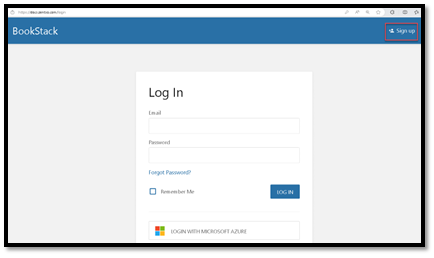
![A screenshot of a login page Description automatically generated with medium confidence](https://docs.zentso.com/uploads/images/gallery/2023-07/embedded-image-n300o7fx.png)
3. Use the “SIGN UP WITH MICROSOFT AZURE” button
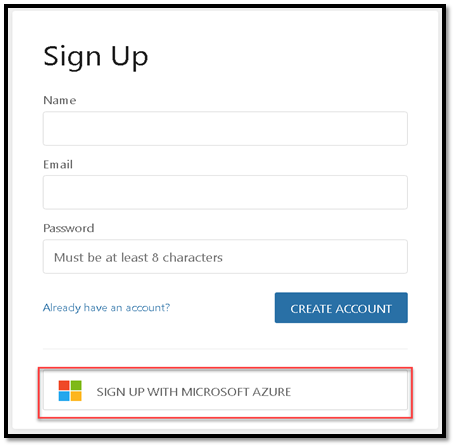
![A screenshot of a login form Description automatically generated with medium confidence](https://docs.zentso.com/uploads/images/gallery/2023-07/embedded-image-l05dcy5y.png)
4. This will redirect you through the Microsoft login page (use your email credentials)
[![image.png](https://docs.zentso.com/uploads/images/gallery/2026-03/scaled-1680-/BV6kvUXraAZb1k2C-image.png)](https://docs.zentso.com/uploads/images/gallery/2026-03/BV6kvUXraAZb1k2C-image.png)
5. Once your login is completed, you will see the screen below
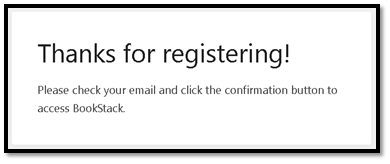
![A picture containing text, font, screenshot, white Description automatically generated](https://docs.zentso.com/uploads/images/gallery/2023-07/embedded-image-a8xvubra.png)
6. Go to your email to confirm the registration notice sent
7. After confirmation, you are ready to use Zentso docs.
8. Login [BookStack (zentso.com)](https://docs.zentso.com/login) using MICROSOFT AZURE
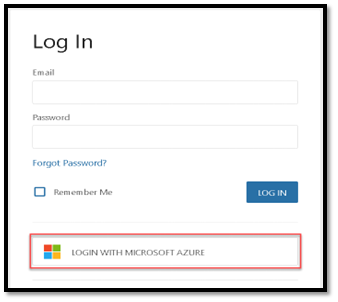
![A screenshot of a login screen Description automatically generated with medium confidence](https://docs.zentso.com/uploads/images/gallery/2023-07/embedded-image-8gi9uv9e.png)