# Workspace

The workspace shows a list of tasks and sub-tasks as well as associated dates and a status.

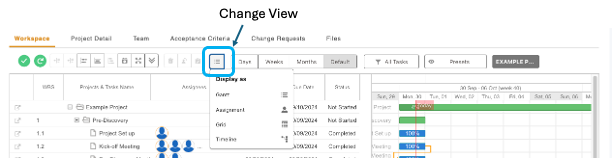
#### **Changing the View:** 

The following views are available for the Workspace:

- Tasks only (Grid),
- Tasks and Gantt chart (Gantt),
- Gantt only (Timeline)

[![image.png](https://docs.zentso.com/uploads/images/gallery/2024-09/scaled-1680-/UIyf1kJtnRkpwPLU-image.png)](https://docs.zentso.com/uploads/images/gallery/2024-09/UIyf1kJtnRkpwPLU-image.png)
#### **<span class="TextRun MacChromeBold SCXW81511480 BCX0" data-contrast="auto" lang="EN-GB" xml:lang="EN-GB"><span class="NormalTextRun SCXW81511480 BCX0">Changing Duration:</span></span><span class="EOP SCXW81511480 BCX0" data-ccp-props="{}"> </span>**

<span class="TextRun SCXW81511480 BCX0" data-contrast="auto" lang="EN-GB" xml:lang="EN-GB"><span class="NormalTextRun SCXW81511480 BCX0">The following durations are available for the Gantt chart:</span></span><span class="EOP SCXW81511480 BCX0" data-ccp-props="{}"> </span>

<div class="SCXW81511480 BCX0" id="bkmrk-days-weeks-%C2%A0-months%C2%A0"><div class="SCXW81511480 BCX0"><div class="ListContainerWrapper SCXW81511480 BCX0">- <span class="TextRun SCXW81511480 BCX0" data-contrast="auto" lang="EN-GB" xml:lang="EN-GB"><span class="NormalTextRun SCXW81511480 BCX0">Days</span></span>
- <span class="NormalTextRun SCXW81511480 BCX0">Weeks </span><span class="EOP SCXW81511480 BCX0" data-ccp-props="{}"> </span>
- Months

</div></div></div>[![image.png](https://docs.zentso.com/uploads/images/gallery/2024-09/scaled-1680-/8Q01TiUmmkdVolHE-image.png)](https://docs.zentso.com/uploads/images/gallery/2024-09/8Q01TiUmmkdVolHE-image.png)

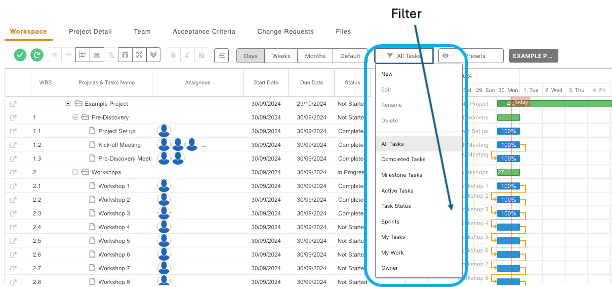
#### **<span class="TextRun MacChromeBold SCXW83588019 BCX0" data-contrast="auto" lang="EN-GB" xml:lang="EN-GB"><span class="NormalTextRun SCXW83588019 BCX0">Filter:</span></span><span class="EOP SCXW83588019 BCX0" data-ccp-props="{}"> </span>**

<span class="TextRun SCXW83588019 BCX0" data-contrast="auto" lang="EN-GB" xml:lang="EN-GB"><span class="NormalTextRun SCXW83588019 BCX0">Filters can be used to adjust the information displayed on the workspace:</span></span>

[![image.png](https://docs.zentso.com/uploads/images/gallery/2024-09/scaled-1680-/nngQxs0kIxLyfZwu-image.png)](https://docs.zentso.com/uploads/images/gallery/2024-09/nngQxs0kIxLyfZwu-image.png)

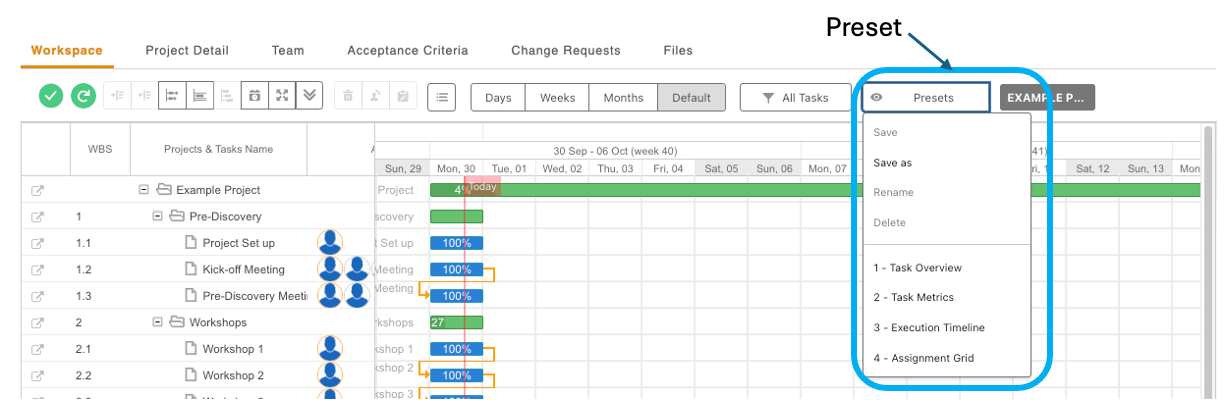
#### **<span class="TextRun MacChromeBold SCXW100431473 BCX0" data-contrast="auto" lang="EN-GB" xml:lang="EN-GB"><span class="NormalTextRun SCXW100431473 BCX0">Preset</span><span class="NormalTextRun SCXW100431473 BCX0">s:</span></span><span class="EOP SCXW100431473 BCX0" data-ccp-props="{}"> </span>**

<span class="TextRun SCXW100431473 BCX0" data-contrast="auto" lang="EN-GB" xml:lang="EN-GB"><span class="NormalTextRun SCXW100431473 BCX0">Presets can be used to save the selected; View, Duration and/or Filter options. Use the ‘Save as’ feature to save the preset.</span></span><span class="EOP SCXW100431473 BCX0" data-ccp-props="{}"> </span>

[![image.png](https://docs.zentso.com/uploads/images/gallery/2024-09/scaled-1680-/KpThvrZwOmbUjeY8-image.png)](https://docs.zentso.com/uploads/images/gallery/2024-09/KpThvrZwOmbUjeY8-image.png)