
AI ContactCenterGuru – Teams for iMIS
Chapter 1 — Executive Overview
Executive Summary
| Publisher | ZENTSO S GmbH |
| Product | AI ContactCenterGuru – Teams for iMIS |
| Audience | iMIS & CloudToolz Clients |
| Version | 2025–2027 Roadmap |
AI ContactCenterGuru integrates Microsoft Teams Phone with the iMIS Staff Site, providing agents with caller identification, AI call summaries, call transcripts, and automated follow-up workflows — all inside iMIS.
Core Promise:
Every call becomes an intelligent CRM event — enriched, analysed, and automated.
Key Benefits
|
Category |
Benefit |
|---|---|
|
Efficiency |
Handle calls directly within iMIS and see caller info instantly. |
|
Automation |
Flowz automates post-call tasks and CRM updates. |
|
AI Insights |
Summaries, transcripts, sentiment, next actions. |
|
Accuracy |
Consistent call logging into iMIS. |
|
Scalability |
Start with CRM Companion; expand to full contact center later. |
|
Compliance |
Azure AD identity, org_id isolation, GDPR-aligned. |
Business Value by Role
|
Role |
Value Proposition |
|---|---|
|
Agents |
Reduce admin; AI handles summaries & logs. |
|
Supervisors |
Queue visibility, call outcomes, agent metrics. |
|
Executives |
KPI dashboards & engagement intelligence. |
|
IT/Admins |
Secure, Teams-native, easy to manage. |
Chapter 2 — Product Strategy
CRM Companion Strategy
AI ContactCenterGuru begins as a CRM Companion, using:
-
Teams Phone Auto Attendants
-
Call Queues
-
Teams Client (for audio)
-
Graph APIs (call records & metadata)
-
CloudToolz + Flowz (workflow automation)
-
AI (summary, transcript, next steps)
This approach provides:
-
Fast implementation
-
Zero disruption to Teams calling
-
Minimal change management
-
High immediate value
-
No need for Unify/TPE yet
Future Unify/TPE Strategy
Once clients need a full CCaaS capability:
-
Add native softphone inside iMIS (ACS Calling SDK)
-
Use Teams Phone Extensibility + Event Grid for PSTN routing
-
Whisper/coach
-
Live supervisor monitoring
-
Custom call flows
-
Contact Center Certification pathway
-
Build advanced supervisor & routing features:
-
This becomes AI ContactCenterGuru CCaaS for iMIS.
Chapter 3 — Solution Architecture
Architecture Overview
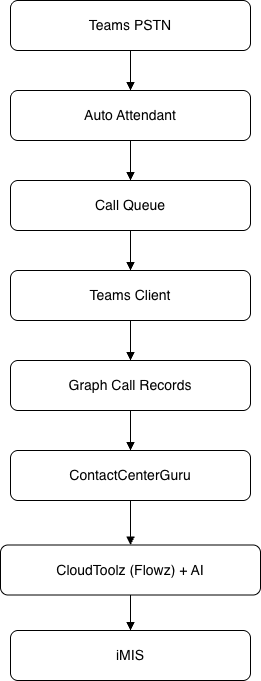
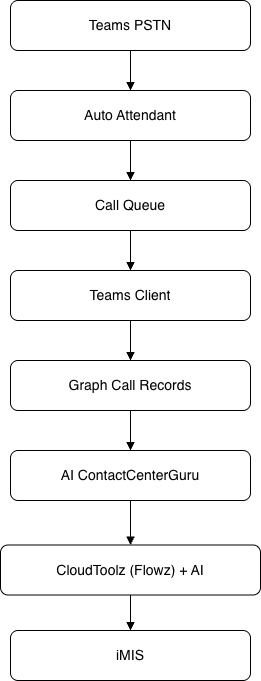
Agents keep using the Teams client for audio, but all integration, automation, and AI run through CloudToolz.
Inbound & Outbound Call Flows
Inbound Call Handling
-
Caller reaches Auto Attendant → Call Queues
-
Agent answers in Teams
-
AI ContactCenterGuru detects call via Graph
-
Contact match → iMIS screen pop
-
Flowz logs the call
-
Recording → AI → Summary + Transcript
-
Results written back into iMIS
Outbound Call Handling
-
iMIS contact → Call via Teams button
-
Teams client initiates the call
-
Call results logged by AI ContactCenterGuru
AI & Flowz Automation
- AI transcription
- AI call summary
- Key actions extracted
- Sentiment scoring
- Suggested follow-up tasks
- Flowz creates:
- Activities
- Cases
- Renewal tasks
- Service workflows
Security & Compliance
-
Azure AD OAuth2
-
CloudToolz instance data isolation
-
GDPR- and Privacy Act 1988-aligned call record handling
-
Optional recording retention policy
-
Logging for audits
Chapter 4 — Roadmap
Roadmap Overview (2025–2027)
- Phase 1 – MVP (Q1 2026)
- Phase 2 – AI & Automation (Q2–Q3 2026)
- Phase 3 – Supervisor Tools (Q4 2026)
- Phase 4 – Optional Unify/TPE (2027+)
Phase Details
Phase 1 – MVP (CRM Companion Core)
-
Screen pop
-
Caller matching
-
Call logging
-
Basic analytics
Phase 2 – AI & Automation
-
AI summary
-
Transcript
-
Recording link
-
Flowz task automation
-
Enhanced dashboards
Phase 3 – Supervisor Tools
-
Queue visibility
-
Agent presence
-
Real-time dashboards
Phase 4 – Optional Unify/TPE
-
Native softphone inside iMIS
-
Advanced call control
Chapter 5 — PERT & Implementation
PERT Overview
AI ContactCenterGuru CRM Companion implementation is based on 13 core work packages, totalling:
≈ 540–720 hours
(depending on AI features and recording availability)
Work Breakdown Structure (13 Tasks)
|
# |
Task |
Phase |
O |
M |
P |
|---|---|---|---|---|---|
|
1 |
Tech Spec & Architecture |
1 |
16 |
20 |
28 |
|
2 |
UI Shell Integration |
1 |
32 |
44 |
64 |
|
3 |
Contact Match & Screen Pop |
1 |
24 |
36 |
50 |
|
4 |
Call Logging |
1 |
24 |
32 |
48 |
|
5 |
Basic Dashboard |
1 |
16 |
24 |
40 |
|
6 |
AI Transcription |
2 |
28 |
40 |
56 |
|
7 |
Flowz Automation |
2 |
32 |
48 |
64 |
|
8 |
iMIS Summary Storage |
2 |
24 |
40 |
56 |
|
9 |
Enhanced Dashboards |
2 |
16 |
28 |
40 |
|
10 |
Queue Monitoring |
3 |
20 |
32 |
48 |
|
11 |
Supervisor Panel |
3 |
24 |
36 |
56 |
|
12 |
UAT & Hardening |
All |
16 |
28 |
40 |
|
13 |
Docs & GTM |
All |
20 |
40 |
60 |
Implementation Timeline & Milestones
|
Milestone |
Target |
|---|---|
|
Prototype |
Jan 2026 |
|
Internal Pilot |
Feb 2026 |
|
Client UAT |
Mar 2026 |
|
GA Release |
Apr 2026 |
|
Full AI + Supervisor |
Q3–Q4 2026 |
|
Optional TPE |
2027 |
Chapter 6 — Deployment & Adoption
Deployment Milestones
-
Technical setup of Auto Attendants & Call Queues
-
CloudToolz integration
-
AI model configuration
-
Flowz workflows
-
User training
-
Go-live
Recommended Client Next Steps
-
Review call flows
-
Identify pilot team
-
Enable AI summaries
-
Roll out in a controlled phase
-
Scale to additional departments